No account yet?

Software Search

Keywords:

Publisher:

Budget Publisher:

Developer:

Genre:

Hardware:

License:

Language:

Year:

Disks:

HD Install:

Chip Ram Required:

Fast Ram Required:

CPU Required:

Compatible Kickstarts:


Media Included:


Who's Online

No Members & 4 Visitors Online

Private Messaging

You are not logged in.

Latest Software

1. HDInstTool
Category: Disk - Partitioning

Top Rated Software

1. HDInstTool
Category: Disk - Partitioning
Home arrow Amiga arrow Software arrow Software Genres arrow Disk - Partitioning arrow HDInstTool
HDInstTool  Print E-mail
Software Disk - Partitioning
Written by Harrison   
Tuesday, 07 October 2008
0-9 - A - B - C - D - E - F - G - H - I - J - K - L - M - N - O - P - Q - R - S - T - U - V - W - X - Y - Z
Editor's rating
9.3
out of 10
Information
Year: 1999
Language:
English 
Disks:
1
Harddrive Installable:
Yes 
Hardware:
A500 (OCS)  A600 (ECS)  A1200 (AGA) 
Additional Hardware Requirements
Chip Ram: 512KB
Minimum CPU: 68000
Compatible Kickstart: 1.3  2  3.0  3.1 
Minimum Operating System: Workbench 1.3
Credits
Publisher: Aminet
Developer: Elaborate Bytes
Coder: Oliver Kastl
Software Notes and Information

HDInstTool is a Harddisk Installation Tool.


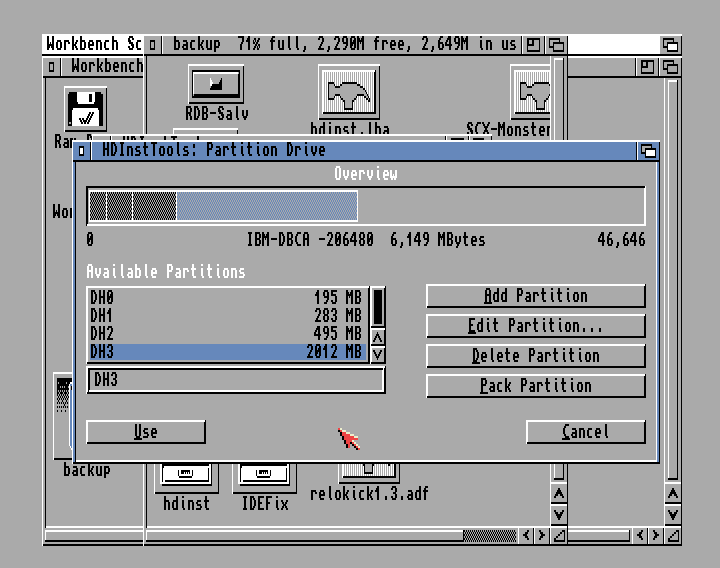
This is a great alternative to Commodore's original HDToolkit partitioning software.  InstTool is much easier to use that HDToolkit and it recognises larger HDs, reporting total HD space and partition sizes correctly, making it safer to use larger HDs over 4GB with your Amiga (as long as you use a supporting file system).  It has built in facilities to handle third party file systems and can also format partititons and copy HD backups onto a newly formatted disk.
Screenshots
Artwork - Boxart, Diskscans, Adverts etc

Media


Manuals and Support Material

Favourite Software of...

This software is a favourite of 0 members (Please Login or Register to add this software to your favorites)
Editor review : Easy to use
2 of 2 people found the following review helpful

Overall rating
9.3
Ease of Set-up
9.0
Ease of Use
8.0
Quality
9.0
Stability
10.0
Documentation
10.0
Value for money
10.0
Having used HDToolkit for many years I was used to its slightly eccentric way of working. Many settings and features were never logically laid out or obvious and for larger HDs (over 4GB) it never reports the correct partition or total HD sizes.

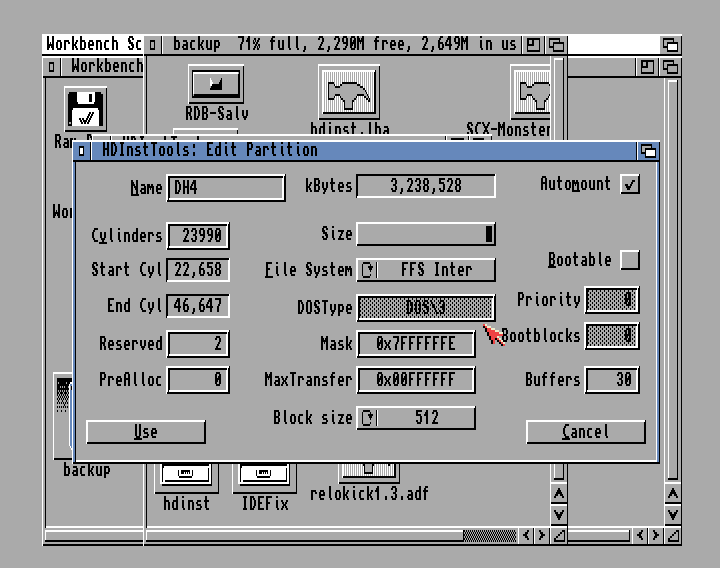
Using HDInstTool is the complete opposite. It has a nicely laid out interface, and each part is very easy to use. The partitioning screen for example is much easier than HDToolKit's to use and with larger HDs it actually supports and reports the correct partition and total HDD sizes. The only negative thing I will say about partitioning is the adjusting of partition sizes. I couldn't find a way to manually type in an exact partition size, and had to instead use a slider to select the size. This slider isn't that accurate and jumps a few 100MB per increment. But it is a small issue and nothing to deter the use of this utility.

It also has direct support for most of the available third party file systems such as SFF so is good to use if you are planning on setting up a large HDD 4GB+.

In addition to setting up and partitioning an HD this program also allows you to format the partitions once they have been created. This is a useful feature as it speeds it up compared to having to format via Workbench or the Shell. It also has a copy feature to allow you to copy the contents of another HD onto your newly partitioned drive.

If you need to setup and partition a drive I recommend you give this a try.
Pros and Cons
Good Points: Very easy to use. The interface is intuitive and unlike HDToolkit is easy to navigate and control.
Bad Points: As with any HDD partitioning software, it is not straight forward for complete beginners. But the documentation is first class and will allow anyone to use the software.
Was this review helpful to you? yes     no
User reviews

There are no user reviews for this item.

To write a review please register or login.

Hits: 214
Comments (0)Add Comment

Write comment
You must be logged in to a comment. Please register if you do not have an account yet.

busy
Last Updated ( Tuesday, 07 October 2008 )